A live monitor for your Claude Code sessions.
A desktop app for Windows and macOS — a compact always-on-top widget that lists your agents with each one’s current status and the task it’s working on. The header tracks your 5-hour and 7-day Anthropic usage limits.
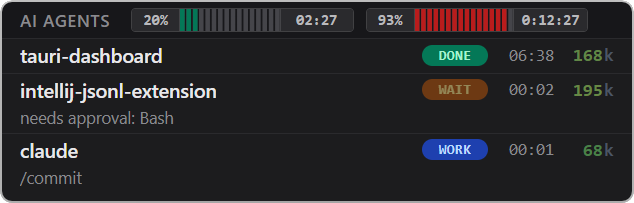
Features
- Notifications — Telegram pings you when an agent is stuck waiting for your input, or when a session’s context fills past a threshold.
- Color terminal tabs — each session’s status appears as a colored circle in its terminal tab, so you see who needs you even without the widget on screen.
- Multi-device sync — track sessions running on your other devices the same way as local ones.
- Focus on the task — once Claude resumes after a question, the row shows your original request, not the yes you typed.
- Context usage — each row shows how full the model’s context is, colored green → amber → red as it fills, so you can tell at a glance whether
/compactis due. - History window — a recap of the work so far: your prompts and Claude’s reply to each, with session boundaries marked.
What’s next?
- Installation — download the widget and connect it to your Claude Code sessions.
- Features — a closer look at everything in the list above, and a few extras.
- Settings — tune every option in the config file, with tray shortcuts for the ones you change most.
- Development — build from source and dig into the architecture and internals.