Three independent filters live in the toolbar between the pane selectors and the stats:

Level filter (minimum severity)
Drop-down with All / Trace / Debug / Info / Warn / Error. Acts as a minimum threshold — Info shows INFO, WARN, ERROR; entries without a level field are dropped when any threshold is active.
Target filter (exact match)
Drop-down populated from every distinct target value in the file (independent of current filters, so you can always switch). Selecting (All) clears the filter. Selecting a specific target keeps only entries with that exact target value.
Text filter (case-insensitive substring)
Case-insensitive substring. An entry matches if the text appears in either its raw JSON or its formatted rendering — so searching for Some(13.0) finds entries whose raw JSON contains Some(13.0) even if prettify has stripped it to 13.0 in the display.
Typing debounces 200 ms.
Filter by selection
Right-click selected text in the Raw, Formatted, or Inspect pane → Filter by “…” (top of the context menu). The selection is written into the text filter and applied immediately, skipping the debounce.
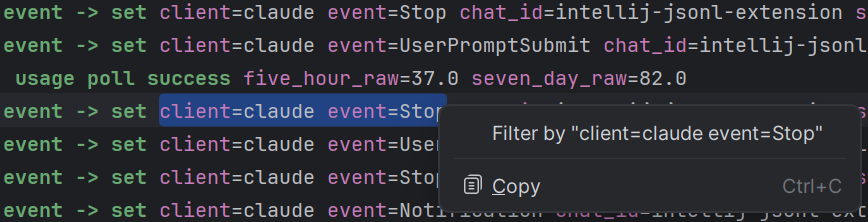
The right-click menu on the read-only viewer panes is intentionally minimal — just “Filter by” and “Copy” — no code-edit clutter.