| Home | Innovation | Azul | Crew | Development | Privacy |
Tracks played cards and communication signals to deduce remaining cards in players’ hands for The Crew: Mission Deep Sea tables with any player count. The side panel displays three sections — a card grid, a player-suit matrix, and a trick history — all updating live as cards are played.
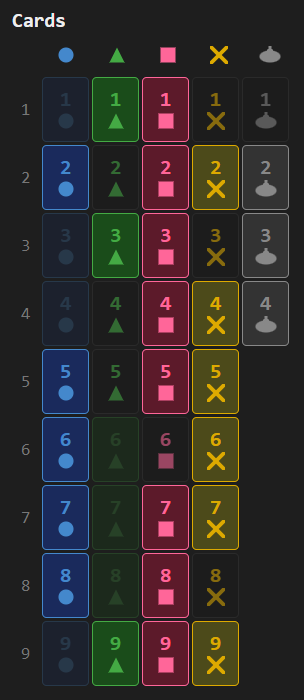
Card grid
Shows all 40 cards (9 cards of each of the 4 coloured suits and 4 submarine trumps) with visual states: dimmed for played cards, neutral for cards in your hand, and bright for cards still in opponents’ hands:
Player-suit matrix
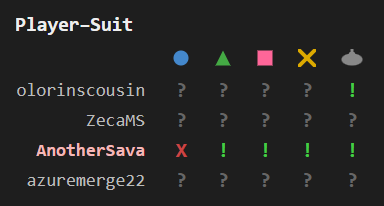
Shows what information we know about players having different suits: “X” (the player has no cards of that suit), “!” (confirmed holding), or “?” (unknown) per player per suit. Each player’s name renders in their actual BGA-assigned color, and your own row is highlighted with a subtle background tint of that color so you stay distinguishable at a glance. Suit absence is detected automatically from trick-following behavior, and communication data narrows down holdings further:
Trick history
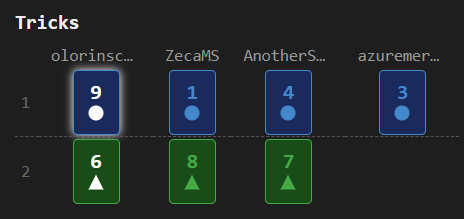
Chronological table of all tricks with lead and winner highlights. Each player’s column header renders in their BGA color, and your own column is tinted to keep you distinguishable. The current in-progress trick appears below a dashed separator:
Game features
- Card grid: summary of the cards information, both played and in players’ hands
- Suit absence detection: automatically detects when a player has no cards of a suit from trick-following behavior
- Communication tracking: integrates sonar communication data to narrow down card locations
- Player-suit matrix: shows “X” (no cards of that suit), “!” (confirmed cards), or “?” (unknown) per player per suit
- Trick history: chronological table of all tricks with lead and winner highlights
- Distress signal: when a distress signal card exchange occurs, tracks the card you gave (resolving it in the recipient’s hand) and the card you received
- Per-mission state: automatically resets tracking on each new mission
Standard features
- Live tracking: while the side panel is open, the display automatically updates when the game progresses — a green status dot appears in the status bar
- Auto-update: while the side panel is open, switching to another supported game tab automatically extracts and displays its state
- Status bar: shows the table number and live tracking indicator
- Auto-hide: three-mode toggle controlling side panel behavior — Never (always open), Leaving BGA (closes on non-BGA tabs), Leaving tables (closes when navigating away from supported game tables)
- Keyboard shortcut: configurable via
chrome://extensions/shortcutsto toggle the side panel open/closed - Lit icon: the toolbar icon glows when the active tab has a supported game table open
- Per-game zoom: side panel zoom level is saved independently for each game and the help page
- Persistent settings: all toggle states, section visibility, and pin mode are saved across sessions
- Download: bundled zip with raw data, game log, game state, and standalone summary — attach this archive with a short description if you notice a bug, and I’ll prioritize fixing it!