Tracks played cards and communication signals to deduce remaining cards in players’ hands for The Crew: Mission Deep Sea tables with any player count. The side panel displays a card grid, a player-suit matrix and a trick history, all updating live as cards are played, and on a mission whose tasks are distributed by free selection it keeps what every player said about them.
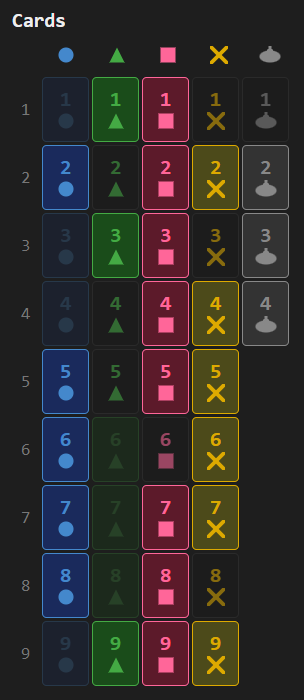
Card grid
Shows all 40 cards (9 cards of each of the 4 coloured suits and 4 submarine trumps) with visual states: dimmed for played cards, neutral for cards in your hand, and bright for cards still in opponents’ hands:
Player-suit matrix
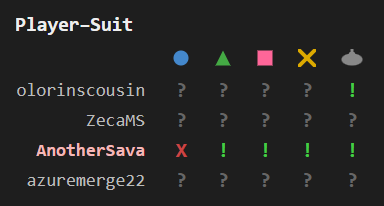
Shows what information we know about players having different suits: “X” (the player has no cards of that suit), “!” (confirmed holding), or “?” (unknown) per player per suit. Each player’s name renders in their actual BGA-assigned color, and your own row is highlighted with a subtle background tint of that color so you stay distinguishable at a glance. Suit absence is detected automatically from trick-following behavior, and communication data narrows down holdings further:
Task opinions
Some missions distribute their tasks by free selection: before anyone takes one, every player rates the tasks on a five-step smiley scale, and only then are they handed out. Those ratings are the only thing said about anyone’s hand before the first card is played, so the panel keeps them for the rest of the mission rather than only while they are being given.
Each player rates in a row of their own, in their BGA colour with your row tinted, under the letters BGA prints on the task cards. The face runs from a grin at the willing end to a frown at the unwilling one, and its colour only repeats what the mouth already says. A task a player has not rated yet leaves an empty cell, so a round still in progress reads as unfinished rather than as indifference. Several tasks may be rated together as one group, and each of them then carries that group’s face.
Below the grid every letter is spelled out with its task, the cards named in it drawn as the same chips the card grid uses:

Trick history
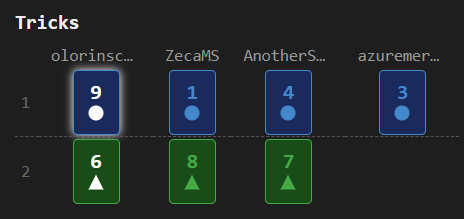
Chronological table of all tricks with lead and winner highlights. Each player’s column header renders in their BGA color, and your own column is tinted to keep you distinguishable. The current in-progress trick appears below a dashed separator:
Game features
- Card grid: summary of the cards information, both played and in players’ hands
- Suit absence detection: automatically detects when a player has no cards of a suit from trick-following behavior
- Communication tracking: integrates sonar communication data to narrow down card locations
- Player-suit matrix: shows “X” (no cards of that suit), “!” (confirmed cards), or “?” (unknown) per player per suit
- Task opinions: on a mission distributed by free selection, keeps every player’s five-step rating of each task once the tasks have been handed out, with the lettered tasks spelled out below the grid
- Trick history: chronological table of all tricks with lead and winner highlights
- Distress signal: when a distress signal card exchange occurs, tracks the card you gave (resolving it in the recipient’s hand) and the card you received
- Per-mission state: automatically resets tracking on each new mission
Standard features
- Live tracking: while the side panel is open, the display automatically updates when the game progresses — a green status dot appears in the status bar
- Auto-update: while the side panel is open, switching to another supported game tab automatically extracts and displays its state
- Status bar: shows the table number and live tracking indicator
- Auto-hide: three-mode toggle controlling side panel behavior — Never (always open), Leaving BGA (closes on non-BGA tabs), Leaving tables (closes when navigating away from supported game tables)
- Keyboard shortcut: configurable via
chrome://extensions/shortcutsto toggle the side panel open/closed - Lit icon: the toolbar icon glows when the active tab has a supported game table open
- Per-game zoom: side panel zoom level is saved independently for each game and the help page
- Compact BGA header: folds BGA’s table info, the current prompt and its action buttons into a single row and trims the bar to fit, reclaiming the vertical space its three stacked rows took; applies to every BGA table, supported game or not, stays frozen at the top while the board scrolls; it is switched from the eye menu on the help page, which also offers “Progression only” — the table number and move count dropped, leaving the percentage in the prompt’s own type
- Pin player panels: keeps the top of BGA’s right column in place while the board scrolls past — under the folded header bar when it is frozen, at the top of the page when it is not. While the turn history is showing in BGA’s log column the whole column is pinned, history and view switch included, and scrolls inside itself if it outgrows the window; otherwise the player panels alone are pinned and BGA’s log column scrolls away as usual, and panels tall enough to take half the window are left alone. Switched from the eye menu on the help page, and applies to every BGA table, supported game or not
- Persistent settings: all toggle states, section visibility, and pin mode are saved across sessions
- Download: bundled zip with raw data, game log, game state, and standalone summary — attach this archive with a short description if you notice a bug, and I’ll prioritize fixing it!