Reads the full game log from Innovation 2-player tables and reconstructs the game state — hand contents and score piles according to revealed cards, and deck stack order with returned cards — displayed as a visual summary in a side panel. Supports the base game and the Echoes of the Past, Cities of Destiny, and Artifacts of History expansions (including the Relics variant).
Hands, forecast and score
Each of those sections shows known cards with their name, icons, and age, while unknown cards appear as placeholders with just the age number and set. Once an unknown card has been narrowed below its full age group, it also shows the number of remaining candidates, and hovering reveals every card it could still be as mini icons. An eye icon represents opponent’s knowledge:
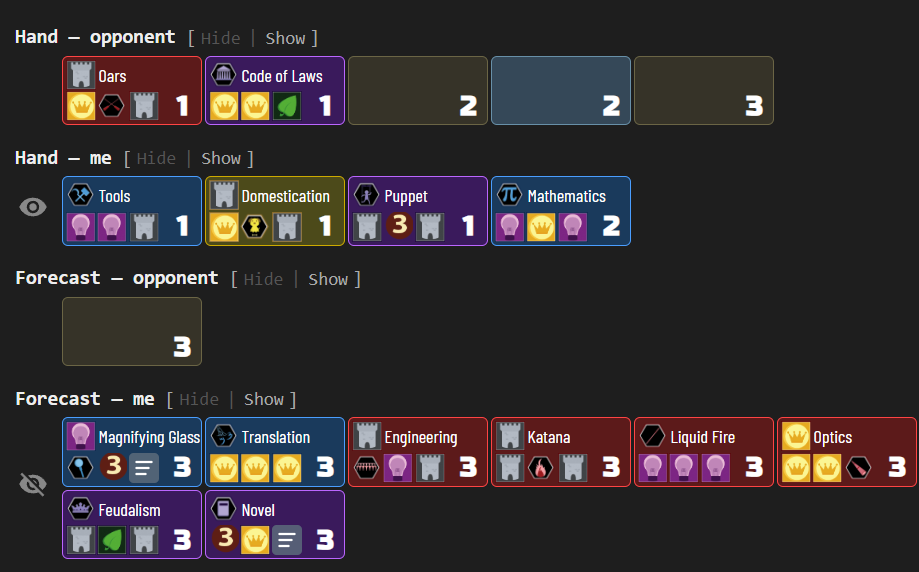
Cards an opponent moves face-down out of their hand or score pile do not blur what is left behind. BGA withholds the card’s name but still reports the slot it came from, and slots are counted per age and set, so the tracker knows which of those cards moved even though it was never named. A hand learnt from a reveal therefore stays known afterwards, and the card that left is followed to wherever it went — the bottom of its deck, most often.
The flip side is that the tracker will not guess a slot. When two cards are known only as a pair — an opponent draws the last two cards of an age, or is dealt two at the start — each shows as one of that pair rather than being assigned a name apiece. Nothing in the log says which is which, and a guess there would be read back as fact the next time one of them moves.
Turn history
A compact sidebar shows recent actions — meld, draw, dogma, endorse, achieve, promote — newest first, with timestamps and player attribution. Each player’s row is rendered in their actual BGA-assigned color, and your own (“you”) row is highlighted with a subtle background tint of that color so it stays distinguishable regardless of which color BGA gave you. Compound actions (e.g. meld → promote → dogma) render as indented sub-action lines. Turns that begin with an Artifact on display show the pre-turn choice (pass, return, or dogma of that Artifact) as an italicized line above the regular actions:
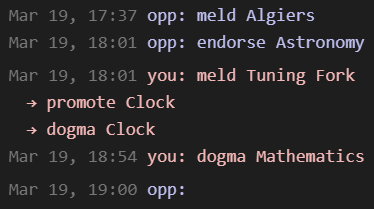
“Show timestamps” in the eye menu stamps each row with the time it happened at; clear it to leave the action alone. It is on by default and belongs to the panel only — BGA’s log column below has a toggle of its own, so a history you read at a glance on the table can go undated while the panel keeps its stamps, or the other way round.
In the BGA game log
The same turn history can render directly in BGA’s own log column instead of the side panel, where it stays visible and keeps updating with the panel closed. Enable it from the eye menu with “Show in BGA game log”. Like the panel, it reads newest-first — matching BGA’s log — and shows the same action lines, but timestamps them with the time only: rows wrap in BGA’s narrow column, and the date would cost a line. It has a “Show timestamps” of its own, indented under it; clearing that leaves the rows bare — worth more here than in the panel, since a stamp on a wrapping row can push the action onto a second line. Card names keep their hover tooltips.
The column shows one log or the other, never both. A lightbulb in the header switches between them — lit while the turn history is up, dim while BGA’s log is — so neither list is out of reach with the side panel closed. “More…” at the foot of the history widens the window beyond the default nine half-turns, and disappears once the whole game is shown. Both that and the switch are temporary: they last for the table you’re on, and a reload or a different table starts from the eye-menu setting again.
Simplified cards on the table
The side panel’s compact card can replace BGA’s illustrated one on the table itself. Enable it from the eye menu with “Simplified cards on BGA’s table”. It covers your hand and every player’s board — the places Innovation shows cards face up at full size — and, as a sub-option, the opponents’ face-down hands as well.
A simplified card drops the illustration and the dogma text, keeping the flat colour of its own colour pile, the card’s icons, its name and its age. The rules text is still a hover away on BGA’s own tooltip. Cards shrink to roughly a quarter of their former area, so a board that used to need scrolling tends to fit the window.
The same board either way — the five colour piles take 502 pixels of height with BGA’s cards, and 172 with these:
Before — BGA’s own cards

After — simplified

The top card of a pile — and every card in your hand, which is never stacked — uses the side panel’s layout, spot for spot: the card’s first icon top-left, the rest along the bottom, the name across the top, and the age in the bottom-right corner. Cities cards use all six icon spots and so show no name, exactly as they do in the panel.
Cards underneath the top one use a second layout, because a splay leaves them showing only a strip and the icons in that strip are the point of splaying. There they take the real card’s geometry: the right-hand icons move out to the right-hand edge and the age moves inboard to the space they leave. So splaying left reveals the card’s last icon (and on a Cities card the top-right one too), splaying right reveals the two left-hand icons, and splaying up reveals the whole bottom row — each exactly as on BGA’s own cards.
The age needs no rule of its own. On a covered card it sits inboard of both side strips, so a pile splayed left or right hides it without being told to, while a pile splayed up reveals the whole bottom row and brings it along. The top card is never covered, so it always shows its age.
A Size slider under the checkbox scales the cards from 100% to 200% in 10% steps. The whole card scales as one — box, icons, name and age together — and so does the strip a splay reveals, so a splayed pile reads the same at every size.
An Echo card carries its effect as running text in one of its icon spots, which no card this small can show. That spot is marked with lines of writing instead, and the effect itself stays a hover away on BGA’s own tooltip. Echo effects as text prints it on the card after all — set in Tahoma, drawn for exactly this kind of small screen text, and clipped to its spot so a long effect cannot spill over the icons around it. It is deliberately tiny at 100%: turn the size slider up, or lean on the browser’s own zoom, and it becomes readable.
Card names are shown in their own capitalisation, as in the side panel. BGA writes them into the page already uppercased, so the extension puts the original back from the game’s own card data; that also means a table played in another language keeps its translated names.
The score piles, achievements and decks are drawn edge-on, with nothing on them to simplify, and the artifact display and revealed cards keep BGA’s artwork.
Note that BGA has a simplified card layout of its own, under its game preferences. That one swaps the illustration for a plain background at the usual card size; this one is a different, denser card, and does not need BGA’s setting on.
Opponents’ hands
An opponent’s hand is the one place BGA shows nothing at all: face-down backs, no name, no age, not even a colour. “Opponents’ hands” under the checkbox fills them in with what the side panel has deduced, drawn as the same card.
A card that has been identified shows its name, icons and age, exactly as it would in the panel. One that has not shows the panel’s placeholder — the age, and above it a count of how many cards it could still be. Hovering either one opens the same tooltip the panel does: every remaining candidate as a mini card for an unknown one, and the full card face for a card that is known.
Cards nothing has been learnt about yet show no count and no tooltip, only the age: a candidate set that still spans the whole age is not information, and the panel says nothing about those either. Neither does a card the tracker has not caught up with — the hands follow the same live extraction the turn history does, so a card drawn a moment ago stays blank for a few seconds until the next one.
Hints are matched to cards by age and set, never one by one. The tracker does follow an opponent’s hand slot by slot, but the backs on the table are laid out in BGA’s own order, which is not the one the panel sorts by — so lining the two up card by card would be a guess dressed as a fact. What is shown against each card is stable between updates, but a card being drawn or played can shuffle which of two equal cards carries which hint.
Because these cards are the panel’s, they follow the size slider along with the rest — and an opponent’s hand takes noticeably more room than BGA’s row of small backs, wrapping onto a second row where their old hand fitted one. Switching just this sub-option off puts BGA’s own backs back and leaves the rest of the simplified cards alone.
Compact table header
This one is not Innovation’s alone — the header it folds is BGA’s own framework, identical on every table, so it applies to every game on the site, supported here or not. It is switched from the eye menu on the help page — the one place it lives, since it belongs to no single game. What follows describes it on an Innovation table, where a few of the game’s own controls are handled too.
BGA’s table page spends three rows on its header: the table id, move number and progression sit in the topbar, the current prompt and its action buttons in a bar of their own below it, and Innovation’s board buttons in a third row under that. This folds all of it into one — the prompt and its buttons move up into the topbar beside the table info, and the bar they came from goes away, leaving that much more of the window for the board. The remaining bar is trimmed as well: a smaller site logo and tighter leading let it shrink to the height its contents actually need — 36 pixels against BGA’s fixed 62 — and the whitespace below it drops from 18 pixels to 5, which also brings the two columns back into line with each other.
The same header either way — 205 pixels of it, and then 54:
Before — BGA’s own, three rows

After — folded, with the “not playing” link gone

Two of Innovation’s board buttons are hidden along the way: “Show compact”, which only changes how far splayed stacks overlap, and “Browse all cards”, which duplicates what the side panel’s card list already shows. BGA’s “This player is not playing: what can I do?” link is hidden too, so a stalled opponent costs no header space.
“Look at all cards in piles” stays, redrawn as an eye icon in the left corner between the site logo and the table info — it toggles what you see rather than doing anything in the game, so it is dimmed until you hover it. BGA’s go-to-next-table control goes the other way, out of the prompt and over to the far right to join the sound, fullscreen and menu icons. It sits there rather than in the left corner because it is not always the small arrow it looks like mid-turn: once your turn ends and other tables are waiting, BGA relabels it “N tables are waiting for you” — a notice rather than a control, so it keeps its full strength.
Everything else in the topbar keeps its place — the sound and fullscreen controls, the game menu, and the reflexion timer, whose three stacked lines (“It’s your turn!”, the clock, and the “I would like to think a little” link) are laid out across so they cost one line instead of three.
The bar also stays put while the board scrolls beneath it, so the prompt, the timer and the table’s progression are readable wherever you are on a long board — worth having only because the bar is now 36 pixels; freezing BGA’s 62-pixel original would have cost a sixth of a laptop screen all game. That is also why it lets go when it has to: a prompt long enough to wrap it, or a game whose own content grows it past a fixed height, gets a bar that scrolls away like BGA’s own, rather than a wall across the top of the board. It freezes again as soon as the bar is back under that height.
A few prompts are simply too long for one line, so they are said shorter — on Ark Nova, “You must choose an action card” becomes “Choose:”, which leaves the action buttons beside it rather than below. Only prompts named for a specific game are touched, and only when they match word for word, so everything else keeps BGA’s own wording. This works on English tables: BGA translates its prompts, and a table played in another language keeps the full sentence.
It is off until you ask for it, under “Compact BGA header” in the help page’s eye menu, and turning it back off puts every element where BGA had it. Nothing is copied or re-rendered: BGA’s own elements are moved, so the prompt, the action buttons and the move counter keep updating exactly as before.
On a game with no support here, only the framework part applies — the row, the trimmed bar and the alignment. Its own controls are left alone, since nothing here knows what they are. One guard comes with that: BGA’s status bar is only collapsed once it holds nothing but the wrappers moved out of it, so a game that keeps a control of its own down there keeps its bar rather than losing what is in it. Collapsed rather than hidden, so BGA’s own end-of-game notice still shows, in its place under the bar, on any game.
Pinned right column
Also BGA’s own framework rather than Innovation’s, so this too applies to every table on the site and is switched from the same eye menu, under “Pin player panels”.
BGA’s board is often several screens tall, and everything in the right column — the player panels with their scores, hand counts and clocks, and the log below them — sits at the top of it, out of view for most of the board. Pinned, that stays at the top of the window while the board scrolls past. Where the folded header bar is frozen above it, it sits underneath it; where it is not — BGA’s own bar, or a folded one grown too tall to freeze — it sits at the very top of the page instead.
What gets pinned depends on what the column is showing:
With the turn history in the column, the whole column is pinned: panels, history and the view switch between the two logs. Nothing there scrolls away, so the last few turns and the switch to BGA’s log are readable wherever you are on the board. A column that outgrows the window keeps its foot reachable with a scrollbar of its own rather than running off the bottom edge — and the panels stay at the top of that too, so scrolling back through the history never pushes them out of view.
With BGA’s own log in the column, the player panels alone are pinned and the log column scrolls away as BGA intended, view switch included. BGA’s log is its own thing, long and self-scrolling, and pinning it would be pinning BGA’s UI rather than ours.
The panels take on the page’s own background while pinned, so whichever log travels behind them does not read up through the gaps between them.
The panels-alone mode lets go under the same reasoning the header bar does. Panels tall enough to take half of what the window has left — a four-player table on a short screen — scroll away as BGA intended, since pinning them would wall off the top of the board rather than keep a reference in view. That is re-judged as the panels grow and as the window is resized, so a table that starts out pinned can let go later and take it back. The pinned column needs no such ceiling: it is capped to the window and scrolls inside itself, so nothing in it can be out of reach however tall it grows.
BGA’s narrow-window layout is left alone. There the two columns are stacked rather than side by side, which puts the column above the board with nothing to travel past — and BGA hides its log column in that layout, so there is no history to pin either.
Police-line highlight
An asynchronous game can leave a decision waiting for you on someone else’s turn — an opponent’s dogma demanding a card, a share you may take — and it is easy to open the table, glance at the board, and miss that it is your move at all. This paints diagonal amber hazard stripes across BGA’s top bar whenever you must act during another player’s turn, so the one moment that is easy to overlook is the one that is impossible to. It stays dark on your own turn and on your own dogma choices — only a genuine cross-turn reaction lights it.
An opponent’s Clock demanding back the cards you revealed, with the header folded to one row:

Whose turn it is comes from BGA’s own live game state rather than the reconstructed log, so the stripes appear the instant the reaction does and clear the instant you act. A “Movement” slider under the toggle scrolls the stripes — its centre is static, its sign the direction, its magnitude the speed — for anything from a still band to a fast barber pole. Switched from the eye menu; on by default on a local build, off on the store one, like the other on-table features.
Card list
The card list lays out all cards in the game across ages, showing which cards have been identified and which remain unknown. Toggle between Base, Echoes, Cities, and Artifacts sets, filter to show only unaccounted cards, and switch between wide and tall layouts:
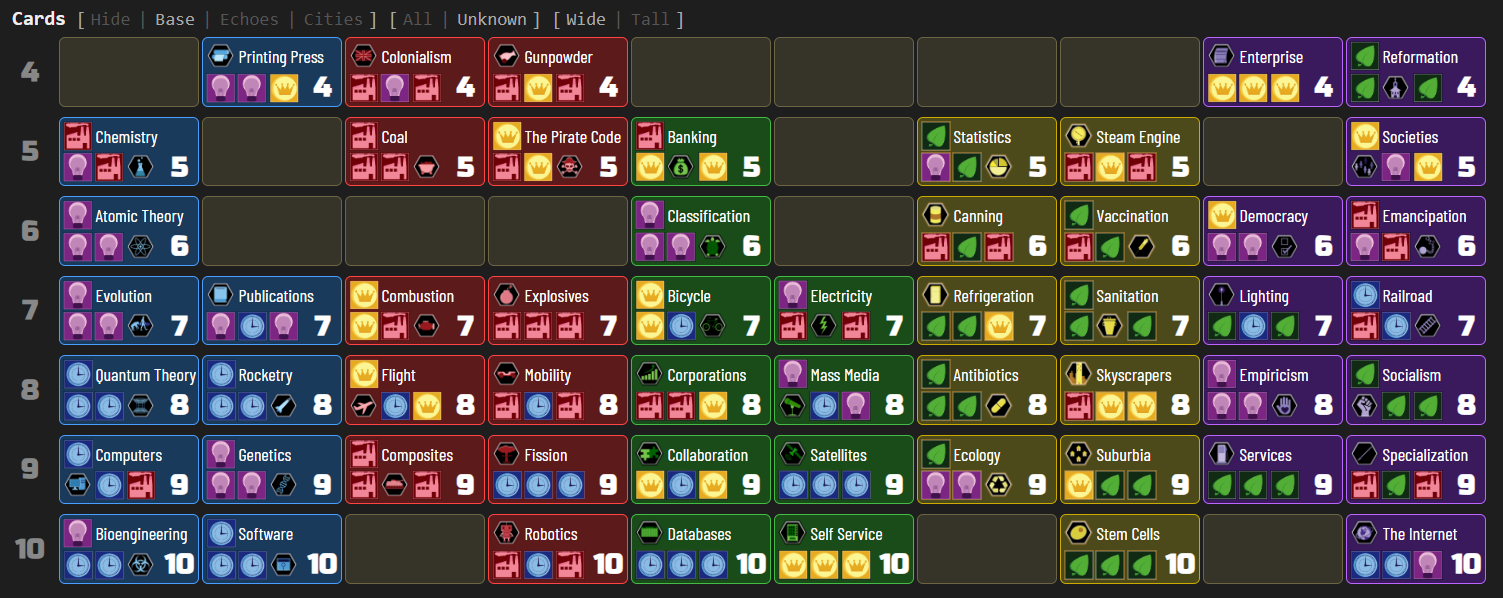
Cards taken out of the game are followed like any other — one at a time by The Big Bang, or by the handful when Fission empties every hand, board and score pile, DeLorean takes the hands and the top of every pile, or Exxon Valdez ends a player. A card that was identified before it left still counts as identified here; one swept out face-down was never identified and stays unknown, its possible names leaving the game with it rather than passing to the cards still in play.
Deck
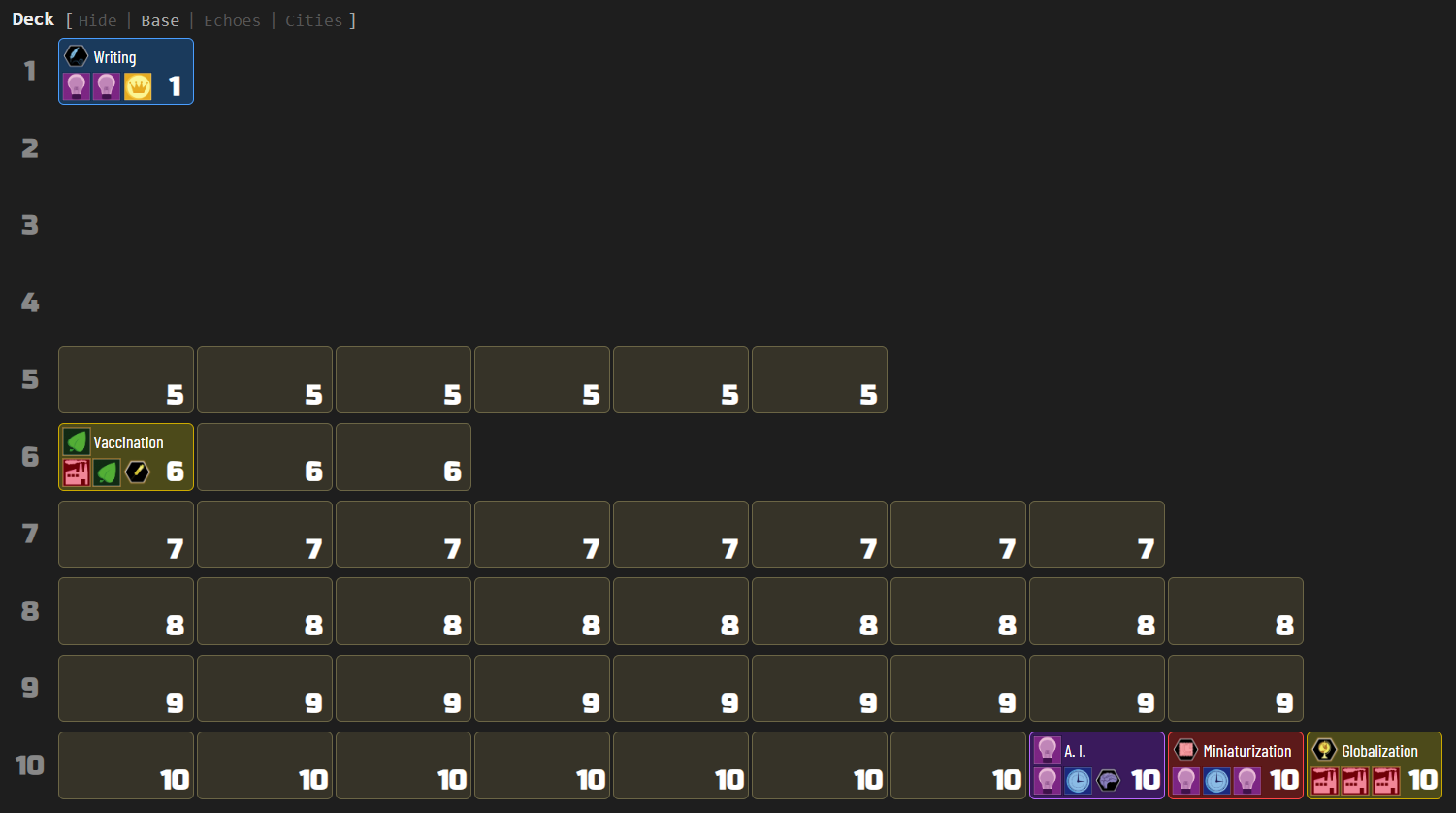
The deck section shows remaining cards per age, with known cards revealed by name and unknown cards as placeholders:
Game features
- Card grids: hands, scores, deck, full card list, achievements
- Set toggle: switch between Base, Echoes, Cities, and Artifacts card sets for deck and card list
- Filter toggle: All / Unknown (show only unaccounted cards)
- Layout toggle: Wide (one row per age) / Tall (color columns)
- Turn history: compact newest-first display of recent actions (meld, draw, dogma, endorse, achieve, promote) with card name tooltips; compound actions (e.g. meld → promote → dogma) render as indented sub-action lines; pre-turn Artifact decisions (pass, return, or dogma) render as an italicized line above the turn’s actions; each player’s row uses their actual BGA-assigned color, with the observer’s row tinted for distinction
- In-page game log: render the turn history in BGA’s own log column instead of the side panel, newest-first; an in-page switch moves between the two logs without reopening the panel
- Simplified cards on the table: draw your hand and every player’s board with the panel’s compact card — flat colour, icons, name and age, at about a quarter of the area; a size slider scales them 100–200%, covered cards use the real card’s icon positions so splayed piles read as before, and Echo effects can be printed as text rather than marked
- Compact table header extras: on top of the shared behaviour, Innovation’s “Show compact” and “Browse all cards” buttons are hidden (the card list here covers the second), and “Look at all cards in piles” becomes an eye icon in the header’s left corner
- Police-line highlight: diagonal amber hazard stripes across BGA’s top bar whenever you must act during another player’s turn, so an asynchronous game cannot leave a decision waiting unnoticed; it stays dark on your own turn and on your own dogma choices, and a “Movement” slider scrolls the stripes from a still band to a fast barber pole
- Player labels: “Show player names” toggle in the display menu switches turn-history labels between “you/opp” (default) and full BGA player names; coloring applies in either mode
- Timestamps: “Show timestamps” stamps each turn-history row with the time it happened at and can be cleared to leave the rows bare, asked separately for the panel and for BGA’s log column so each surface answers for itself; both start stamped
- Section selector: eye button to show/hide entire sections (including turn history visibility)
- Hover tooltips: known cards show their full face image on hover; narrowed unknown cards display their candidate count and show every remaining candidate as mini card icons on hover
Standard features
- Live tracking: while the side panel is open, the display automatically updates when the game progresses — a green status dot appears in the status bar
- Auto-update: while the side panel is open, switching to another supported game tab automatically extracts and displays its state
- Status bar: shows the table number and live tracking indicator
- Auto-hide: three-mode toggle controlling side panel behavior — Never (always open), Leaving BGA (closes on non-BGA tabs), Leaving tables (closes when navigating away from supported game tables)
- Keyboard shortcut: configurable via
chrome://extensions/shortcutsto toggle the side panel open/closed - Lit icon: the toolbar icon glows when the active tab has a supported game table open
- Per-game zoom: side panel zoom level is saved independently for each game and the help page
- Compact BGA header: folds BGA’s table info, the current prompt and its action buttons into a single row and trims the bar to fit, reclaiming the vertical space its three stacked rows took; applies to every BGA table, supported game or not, stays frozen at the top while the board scrolls; it is switched from the eye menu on the help page, which also offers “Progression only” — the table number and move count dropped, leaving the percentage in the prompt’s own type
- Pin player panels: keeps the top of BGA’s right column in place while the board scrolls past — under the folded header bar when it is frozen, at the top of the page when it is not. While the turn history is showing in BGA’s log column the whole column is pinned, history and view switch included, and scrolls inside itself if it outgrows the window; otherwise the player panels alone are pinned and BGA’s log column scrolls away as usual, and panels tall enough to take half the window are left alone. Switched from the eye menu on the help page, and applies to every BGA table, supported game or not
- Persistent settings: all toggle states, section visibility, and pin mode are saved across sessions
- Download: bundled zip with raw data, game log, game state, and standalone summary — attach this archive with a short description if you notice a bug, and I’ll prioritize fixing it!